What the recipient of a share link can see
You sent your architect a share link. Now you want to know — exactly — what they will see when they click it. Not a vague "they can view the plan", but the actual scope. This article walks the boundary line in detail.
01One link is one plan
In Hemma today, sharing is always per-plan. Every share link points at exactly one PDF or image. There is no "share my whole project" mode. If you want your architect to see two plans, you generate two links.
That is a deliberate design choice. Most outside collaborators — architects, structural engineers, the kitchen designer — only need the document the conversation is about. Limiting the link to one plan keeps the rest of your project private without you having to think about it.
02What the recipient sees on first visit
When your recipient clicks the link, Hemma asks them to confirm the email address you invited. A short safety step that means a forwarded link is useless on its own.
After they enter their email, Hemma sends a magic link to that address. They click it, and the plan opens.
What loads on the page:
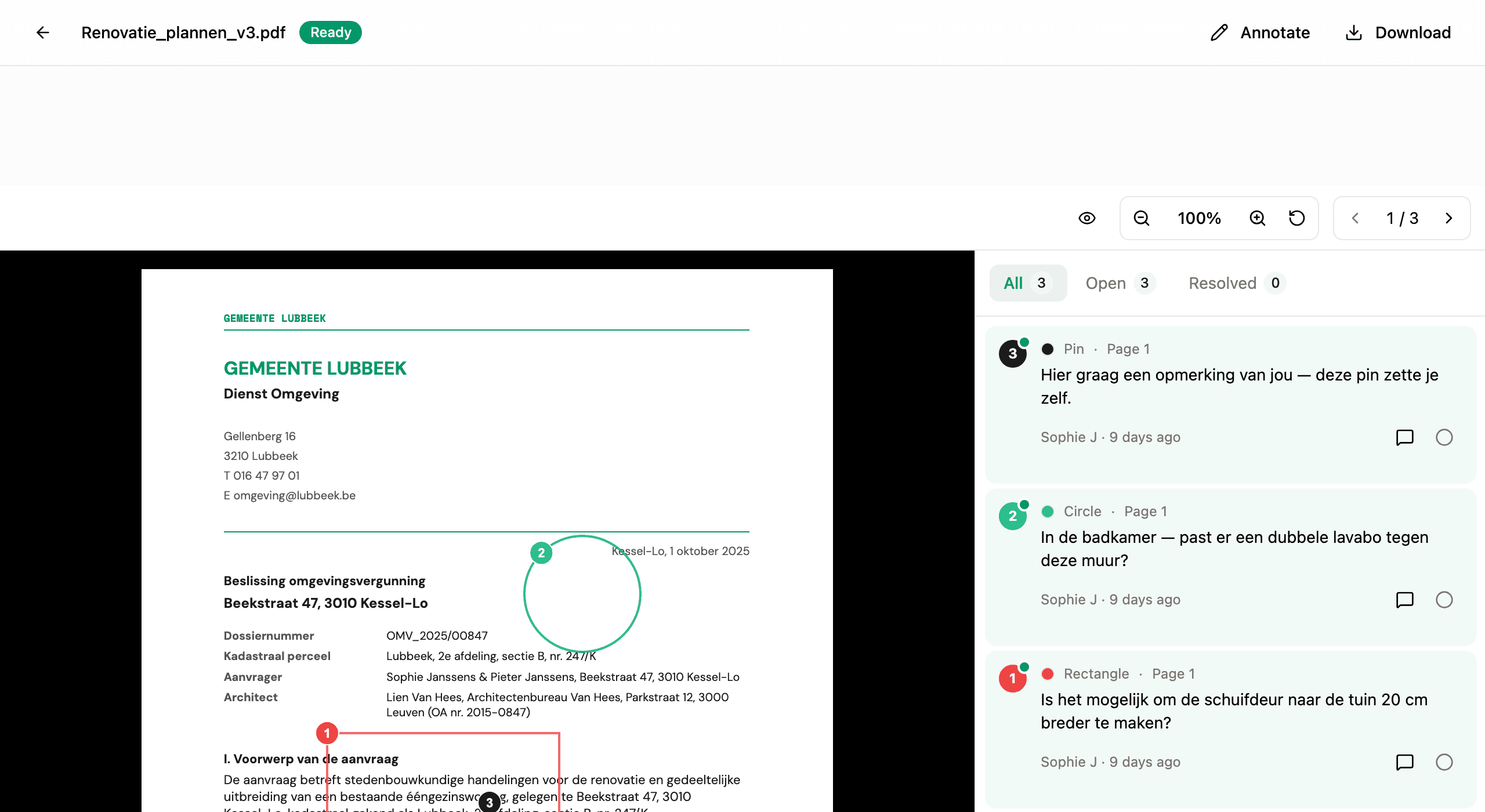
- The plan itself. Exactly the PDF or image you uploaded, rendered in Hemma's viewer.
- Every annotation on the plan. Yours, your partner's, and any other architect's. Including replies and resolved status.
- A header with context. The name of the person who shared the plan, the project name, and the plan's title. Enough so they know what they are looking at and who invited them.
- A reply field on every annotation. Plus the ability to drop their own pins.
03What the recipient does not see
This is the important list. Anything not in the recipient view stays private:
- Any other plan, image, or document in your project. A share link to one plan does not unlock siblings. Your other plans, your invoices, your quotes, your photos — none of them are reachable.
- Your budget. Totals, line items, the canonical template, links between invoices and budget lines. The recipient cannot see that any of this exists.
- Your contractors. The Contractors page, contractor detail pages, financial history — invisible.
- Other people on your project. The recipient does not see who else is on the project, beyond the names of people whose annotations appear on the shared plan.
- Your settings or account. Project name beyond what's shown in the header, project email address, integrations, the senders waiting room — none of it.
- Other shared plans. If you have shared three plans with the same architect via three separate links, opening one does not show the other two. They are independent.
04What the recipient can do, exactly
Architects and other shared-link viewers work with a deliberately smaller toolkit than project members. They can:
- Drop pins to point at a specific spot on the plan. Pins only — no circles, rectangles, arrows, or freehand. The thinking: their job in this conversation is to advise and confirm, not to redline.
- Reply to any annotation, including yours. Replies show their name and trigger an email to everyone else on the thread.
- Mark their own annotations resolved. They cannot unilaterally close a conversation that you started.
- Re-open the plan as often as they want, until the link expires or you revoke it. See managing share links for both.
Replies and pins they create are stored against the plan and stay there even after the share link is revoked or expires. The conversation does not disappear when access does.
05Common questions
Can I let them download the plan? They can use their browser's download on the rendered PDF/image. There is no "disable download" toggle today — the plan is meant to be looked at, not locked behind DRM.
Can my architect see when I update the plan? If you upload a new version, the share link still points at the same record, so when they reload, they see the new file. Annotations from the old version stay attached and may now be in the wrong spot — that is one reason most projects re-share when they swap a major plan revision.
Can two architects share the same link? No. Each link is bound to one email address. If you have two architects, generate two links.
Can the recipient invite someone else? No. Their access is tied to their email; they cannot extend it. If you want a third person involved, send them their own link.
06What if it goes wrong
- The recipient says they only see "Link no longer available": the link is expired or revoked. See my architect can't open the share link.
- The recipient sees the plan but cannot reply: they signed in with the wrong email address. The reply tools only appear when the magic-link verification matches the email you invited.
- The recipient drew on the plan and the markup did not save: refresh the page. Saved annotations re-appear; truly lost markups indicate a network drop during draw — re-do them.