How to compare quotes with Hemma
Three quotes for your roof. Three different layouts, three different prices, three different terms. You want to compare them, but you're drowning in detail. This is where Hemma saves you real money. Upload your quotes, and Hemma puts them side by side. Clear, fair, and in plain language.
01How comparison starts
Upload two or more quotes for the same type of work. Roofing, electrical, plumbing, anything. Hemma reads each quote, identifies the trade, and sees that they are comparable.
You don't need to pair them up yourself. Hemma groups quotes automatically by the type of work. A pair is ready to compare once two things are true: Hemma has read each quote with confidence (or you've confirmed the details on any it wasn't sure about), and you've linked each quote to your budget. As soon as two or more checked, budget-linked quotes exist for the same trade, a comparison card appears on your home screen.
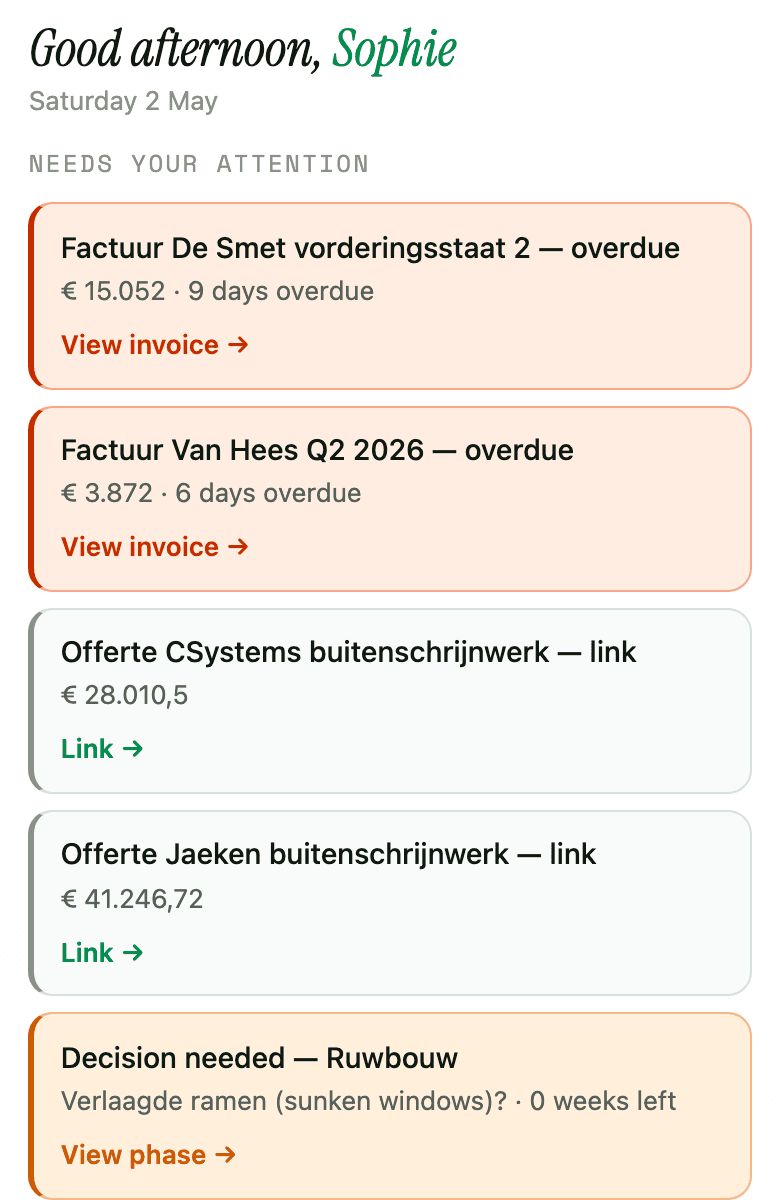
Tap "Compare" and Hemma does the rest. Within seconds, you have a full overview.
On the comparison page itself, a quote you haven't confirmed on your budget yet is already shown, marked "Not yet confirmed". You can compare it straight away. To choose it, confirm it first under What was agreed; the page links you there.
02What the comparison shows
The page is named after the budget line the quotes are for, such as "Compare quotes for Electrical", with how much you planned for that line.
- Hemma's read. A short, plain-language read of the trade-offs, marked as Hemma's, with questions you might ask the contractors.
- Prices side by side. The price on each quote, exact and to the cent. That price always counts. Beside it, Hemma shows a like-for-like figure marked with ~: an estimate of what the quote would cost if it covered the same work as the others. Below that, each quote's price against what you planned for the line.
- Scope differences. What's included in one quote but not the other. This is often where the real difference lies.
- Visual and material choices. Colours, brands, and finishes each contractor proposes.
- Budget impact. How each quote affects your overall budget.
- Specifications. Materials and methods compared in detail.
- Elements. When the quotes break down by element (rooms, building parts), you see them lined up against each other.
You don't need to read both documents front to back. Hemma highlights what matters.
03Hemma's analysis
This is where it gets interesting. Hemma writes a plain-language analysis: which quote is cheapest, which includes the most, and what the trade-offs are. No jargon, no footnotes. Just a clear overview.
This is not a recommendation. Hemma does not choose for you. It shows the facts, explains the differences, and lets you decide. But it's the kind of overview you normally only get if you pay an architect to review your quotes.
And you get it here for free. With every comparison. Automatically.
04Choosing a quote
When you're ready to decide, tap the button with the contractor's name, such as "Choose Elektro Wouters". Hemma asks you to confirm, then records your choice on your budget line. Nothing is sent to the contractor.
The questions in Hemma's read stay one tap away: draft an email to the contractor, or create a reminder or task.
Changed your mind? No problem. You can update your choice at any time.
05Getting the most out of comparisons
Upload quotes as PDFs when you can. PDFs give Hemma the most information to work with. Photos work too, but PDF is better.
Make sure the quotes are for the same type of work. Hemma groups by trade. A roofing quote and an electrical quote will not be compared.
The more quotes, the better the comparison. Two quotes is good. Three quotes for roofing is better than two. You'll see patterns that two quotes can't reveal.
The comparison card on your home screen appears once two quotes are checked and linked to your budget. If it isn't showing yet, open the quotes and make sure they're reviewed and connected to a budget line.